Practical Data Wrangling
Data Wrangling (scale, rename, residualize twin data, standardizing)
There are a range of cases where it is useful to manipulate data for modeling: for convenience (e.g. re-naming variables), to help ensure good solutions, e.g., by re-scaling variables, scaling specialized data e.g. twin data. This post covers umx support for these needs.
We often want to residualize several variables prior to analysis. You might, for instance, want to control for (residualize) the effects of age from depression scores. In twin-data, it is critical to use the same residual formula for all copies of a variable in the wide dataset. This can lead to complex, error-prone and lengthy code. umx helps with this.
This post covers:
- Simple residualization using
umx_residualize - Residualizing twin (wide) data using
umx_residualize
umx_residualize provides a formula interface to residualization.
To residualize miles per gallon controlling for engine cylinders and cylinders-squared in the mtcars dataset, you say:
r1 = umx_residualize(mpg ~ cyl + I(cyl^2) + disp, data = mtcars)
Residualizing twin Data
Twin data is usually “wide” - 1-family per row. This complex-ifies normal approaches to residualization.
You MUST residualize data for both twins using the same beta weights. This means making the data long, residualizing, then setting the data back to wide format. umx does this in one line:
twinData = umx_residualize(Achievement ~ Sex + Age + I(Age^2), suffix = "_T", data = twinData)
If you don’t like formula interface, you can say:
df= umx_residualize(var="DEP", covs="age", suffixes= c("_T1", "_T2"), data=df)
umx_residualise can also residualize more than one dependent variable (though not with formulae yet). So this works:
twinData = umx_residualize(c("Achievement", "Motivation"), covs= c("Sex", "Age"), suffix = "_T", data = twinData)
umx_scale
Variables which have very small or very disparate variances can make modelling harder to optimize. Sometimes too we want to scale variables just to get parameters on a standardized scale
Here is a modelling example where we call umx_scale to standardize all variables.
df = umx_scale(mtcars)
m1 = umxRAM("scaled", data = df,
	umxPath(cov = c("disp", "wt")),
	umxPath(c("disp", "wt"), to = "mpg"),
	umxPath(v.m.   = c("disp", "wt", "mpg"))
)
plot(m1, mean=FALSE)
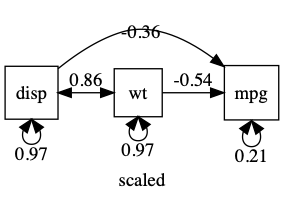
note: umxSummary and plot will standardized SEM output with std = TRUE
note: umxAPA(std=TRUE) will also standardize many types of lm, glm etc.
Renaming variables
umx provides umx_rename to ease renaming variables
df = umx_rename(df, from = c("disp", "wt"), to = c("engine_displacement", "car_weight"))
You can also use regular expressions:
tmp = umx_rename(tmp, regex = "lacement", to = "", test= TRUE)